


Using the Committee Menus

Last updated: Sep 25, 2026
48
views

Using the Committee Menus
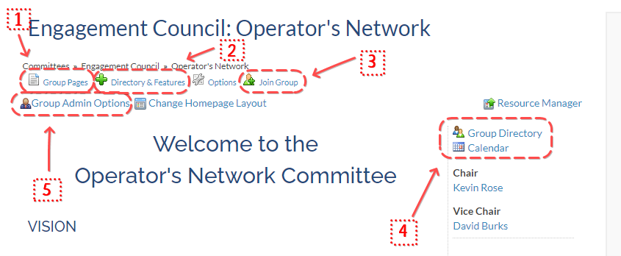
- Group Pages - When clicked over, shows all Custom Pages you have made visible in menu
- Directory & Features - Functions as Feature Nav Menu. Content can be changed in Homepage Options portion of Group Admin Options menu. Won’t display if you have nothing in it.
- Join Group - Only appears if you haven’t joined the group. If approval is required to join a committee, will appear as Request to Join
- Nav Menu - Duplicates #2 exactly. Display location can change (including hidden entirely) depending on where you put Group Navigation in Change Homepage Layout section
- Group Admin Options - **The Most Important One.** Only appears if you have Admin Group rights. Contains essentially all admin functionality for committee pages, events, and almost all things in YourMembership.

